> For the complete documentation index, see [llms.txt](https://docs.getint.io/llms.txt). Markdown versions of documentation pages are available by appending `.md` to page URLs; this page is available as [Markdown](https://docs.getint.io/getintio-platform/how-to-use-the-getint-side-panel-in-jira.md).
# How to Use the Getint Side Panel in Jira
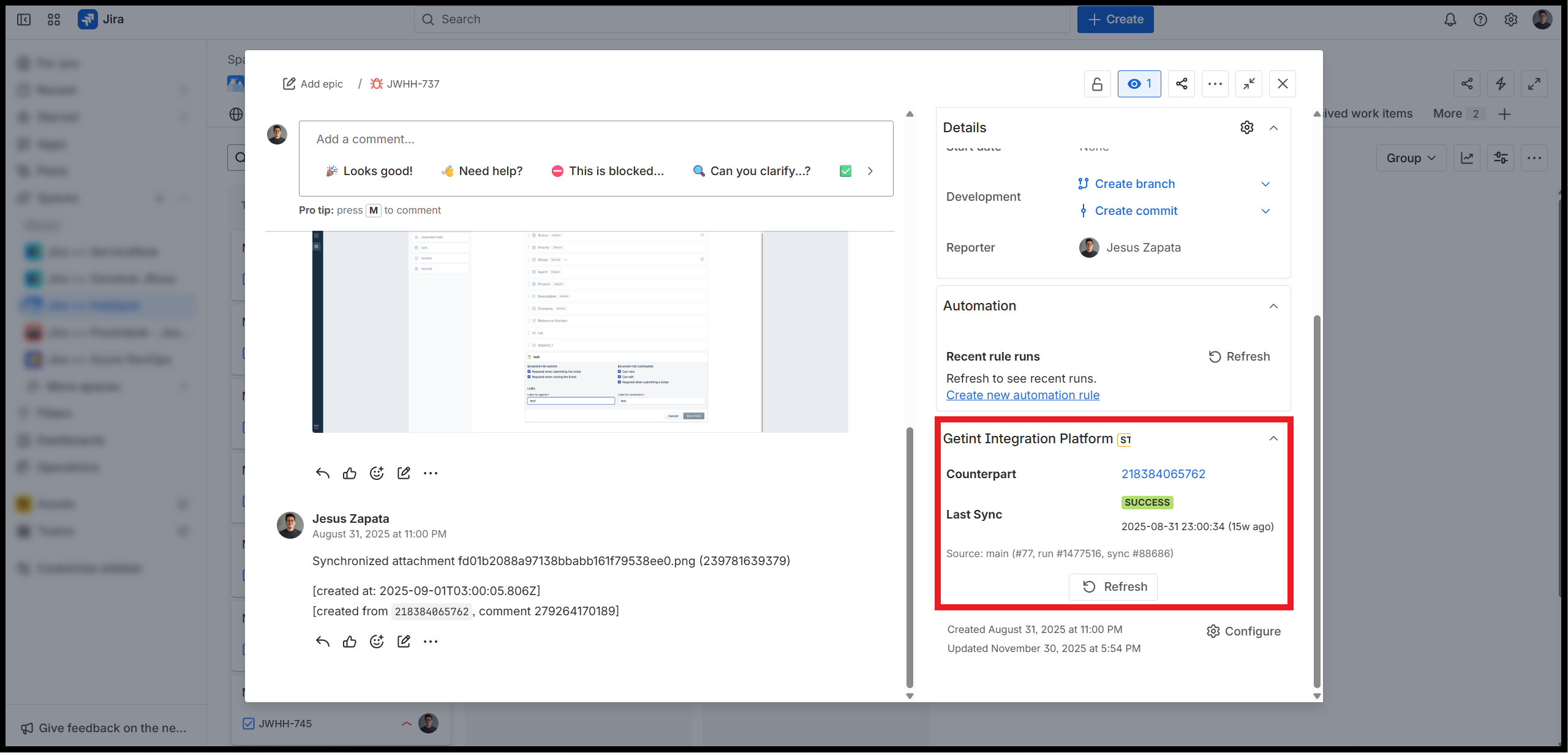
For teams juggling multiple tools and integrations, context-switching is a productivity killer. Getint has addressed this challenge by introducing a **side panel in Jira Cloud** that surfaces integration sync status directly within Jira work items. This enhancement eliminates the need to launch the app to see if your work items are syncing properly.
{% hint style="warning" %}
The side panel appears automatically in your Jira work items only when the **Forge version** of the Getint app is installed in your instance. This applies to every connector app — make sure the Forge version is installed on each platform involved in the integration.
For **Jira-to-Jira integrations**, the app must be installed on **both instances** for the panel to appear on both sides. If you are using a dedicated license that keeps the app out of one of the instances, the side panel will only be visible in the instance where the app is running.
{% endhint %}
### What the Side Panel Offers
The **Getint Integration Platform Panel** now appears in the right-hand sidebar of Jira issues. It provides:
* **Sync Success Indicators**: Shows whether a task was successfully synchronized.
* **Last Sync Timestamp**: Displays the date and time of the most recent sync.
* **Direct Links to Synced Tasks**: Enables quick navigation to the counterpart items synced with Getint.
### Why It Matters
Getint designed this feature to reduce friction in cross-platform collaboration. By embedding sync visibility into Jira, teams gain:
* **Faster Reactions**: Immediate awareness of failed syncs allows quick troubleshooting.
* **Empowered Teams:** Visibility isn't limited to admins, as any Jira user can check the sync status and report any failures or errors to the corresponding team(s).
* **Greater Transparency**: Clear, accessible sync information builds trust in integrations.
### Key Considerations
* Currently available only for **Jira Cloud**; support for Jira Data Center is planned.
* Requires proper configuration of Getint integrations to ensure accurate sync visibility.
* Teams should establish clear ownership for troubleshooting failed syncs.
For more details or assistance with the setup, make sure to [contact us](https://getintio.atlassian.net/servicedesk/customer/portals).
---
# Agent Instructions
This documentation is published with GitBook. GitBook is the documentation platform designed so that both humans and AI agents can read, navigate, and reason over technical content effectively. Learn more at gitbook.com.
## Querying This Documentation
If you need additional information that is not directly available in this page, you can query the documentation by asking a question.
Perform an HTTP GET request on the following URL with the `ask` and `goal` query parameters:
```
GET https://docs.getint.io/getintio-platform/how-to-use-the-getint-side-panel-in-jira.md?ask=&goal=
```
`ask` is the immediate question: it should be specific, self-contained, and written in natural language.
`goal` is what the user is ultimately trying to achieve, the reason they need the answer. Sharing it helps GitBook give you a better, more relevant answer. A goal is most helpful when it describes the outcome the user wants rather than restating the question. For example, with `ask=how do I create an API token`, a goal like `automate deployments from our CI pipeline` lets GitBook tailor the answer to that use case.
The response will contain a direct answer to the question and relevant excerpts and sources from the documentation.
Use this mechanism when the answer is not explicitly present in the current page, you need clarification or additional context, or you want to retrieve related documentation sections.